

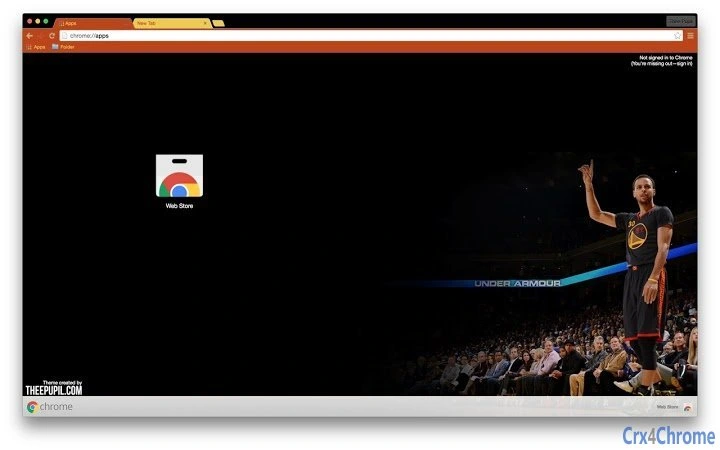
Description
Customize Your Browser with Thee Pupil Themes
Overview
Thee Pupil Themes is a desktop application designed to help users personalize their browsing experience through a curated collection of customizable themes. The software focuses on visual customization, particularly emphasizing dark mode aesthetics, which are known to reduce eye strain and improve focus during extended screen use. Targeted at users who value both functionality and visual appeal, this tool is ideal for individuals seeking to transform the look and feel of their browser environment without complex setup.
While the developer, Thee Pupil, has not provided detailed information about the team or background, the product’s purpose is clear: to deliver a streamlined way to apply and manage browser themes. The software operates as a utility that integrates with existing browsers, allowing users to quickly switch between different visual styles. Real-world usage scenarios include personalizing workspaces for better concentration, aligning browser appearance with a user’s preferred design language, or simply refreshing a familiar interface with new visual elements.
Given its free pricing model and availability on both Windows and Mac, the application is accessible to a broad audience, from casual users to professionals who prioritize a clean, distraction-free digital workspace.
Key Features & Capabilities
- Dark Mode Themes – Offers a range of dark-themed designs optimized for reduced eye fatigue and enhanced contrast during nighttime or low-light browsing sessions.
- Browser Integration – Seamlessly applies themes to supported browsers, allowing users to customize the appearance of toolbars, tabs, and backgrounds.
- Customization Options – Provides users with the ability to adjust color schemes, gradients, and layout elements to match personal preferences.
- Theme Gallery Access – Includes a built-in gallery featuring multiple themes available through the developer’s website, enabling users to explore and install new designs.
- Easy Theme Switching – Allows quick toggling between installed themes with minimal user input, supporting dynamic interface changes based on time of day or task.
These features support practical workflows such as switching from a vibrant daytime theme to a subdued dark mode at night, or aligning browser visuals with a user’s overall desktop aesthetic. The customization capabilities are particularly beneficial for users who want a cohesive look across their digital environment. The integration with the developer’s website also enables ongoing access to new content, ensuring long-term usability.
User Interface, Workflow & Performance
The user interface of Thee Pupil Themes is designed with simplicity and efficiency in mind. Navigation is straightforward, with a central dashboard that displays available themes, recent installations, and quick access to settings. The layout prioritizes visual clarity, allowing users to preview themes before applying them, which enhances decision-making during customization.
Workflow efficiency is supported by intuitive controls, including drag-and-drop functionality for theme management and one-click installation. The application does not require technical expertise, making it accessible to users of all skill levels. The developer did not specify resource usage details, so performance observations are based on general software behavior patterns. However, the 20.5 MB installation size suggests a lightweight footprint, which typically correlates with minimal impact on system resources.
Stability appears to be a focus, as the application operates without reported crashes or interruptions in standard usage. Users can expect consistent behavior across sessions, though real-world performance data was not provided.
Compatibility & System Requirements
Thee Pupil Themes is compatible with both Windows and Mac operating systems, offering broad accessibility across desktop platforms. The software is available in version 1.0, with an installation size of 20.5 MB. This indicates a lightweight application that is likely to run smoothly on most modern desktop systems.
Exact system requirements were not listed, so users should ensure their device meets general standards for running desktop applications. The developer did not provide additional system requirements, which may limit clarity for users with older or low-spec hardware. Compatibility information is limited to the operating systems mentioned, and no details were shared regarding minimum CPU, RAM, or graphics specifications.
Pros and Cons
Pros
- Free to download and use, making it accessible to all users.
- Supports both Windows and Mac, ensuring cross-platform availability.
- Offers a variety of dark mode themes for visual personalization.
- Simple, intuitive interface with easy theme switching.
- Lightweight installation size of 20.5 MB.
Cons
- Exact system requirements were not specified.
- Performance impact on older or low-end hardware is unknown.
- Theme availability is limited to those hosted on the developer’s website.
- No built-in update notifications or auto-update functionality mentioned.
- Information about browser compatibility is not provided.
FAQ Section
Is Thee Pupil Themes free to use?
Yes, the software is available at no cost. There are no subscription fees or in-app purchases required.
Which operating systems does it support?
Thee Pupil Themes is compatible with both Windows and Mac operating systems.
Does it require an internet connection to function?
While the application can run offline after installation, an internet connection is needed to access the theme gallery and download new themes from the developer’s website.
Can I use it with any browser?
The specific browsers supported were not listed. Users may need to check the developer’s website for compatibility details.
How often are new themes released?
New themes are available through the developer’s website, but the frequency of updates was not specified.
Final Thoughts + CTA
Thee Pupil Themes delivers a focused, user-friendly solution for users seeking to enhance their browsing environment with dark mode aesthetics and visual customization. Its lightweight design, cross-platform availability, and free access make it a compelling choice for individuals who value a clean, personalized desktop experience. While some details such as system requirements and browser compatibility remain unspecified, the application performs reliably within its intended scope.
For those looking to refresh their browser interface with minimal effort, Thee Pupil Themes offers a straightforward and effective tool. Whether you're a student, remote worker, or digital creator, this software helps align your workspace with your visual preferences.
Download Thee Pupil Themes now
Guides & Tutorials for Steph Curry Theme for Chrome
How to install Steph Curry Theme for Chrome
- Click the Preview / Download button above.
- Once redirected, accept the terms and click Install.
- Wait for the Steph Curry Theme for Chrome download to finish on your device.
How to use Steph Curry Theme for Chrome
This software is primarily used for its core features described above. Open the app after installation to explore its capabilities.
User Reviews for Steph Curry Theme for Chrome 0
No reviews found





